
Adobe integrates Photoshop, Express, and Acrobat into ChatGPT
Adobe is integrating its key services—Photoshop, Express, and Acrobat—into the ChatGPT interface. Users can now upload images, design layouts, or PDF documents to the chat, and the neural network will automatically detect the appropriate Adobe tool for processing.

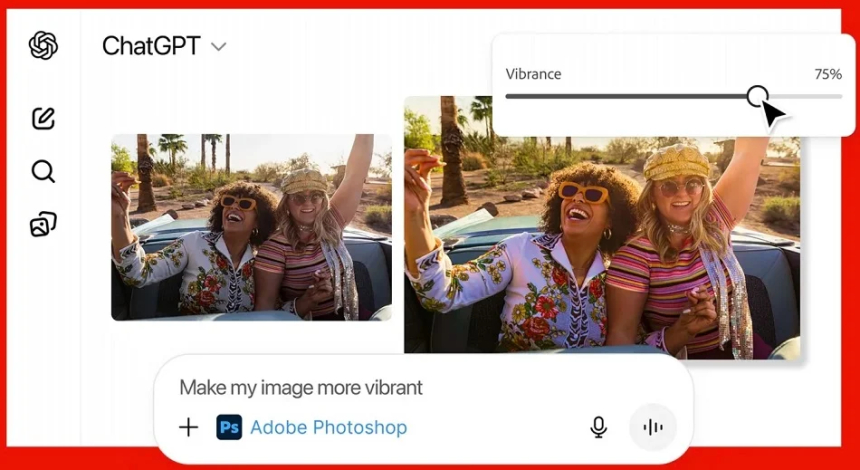
Adobe has combined the capabilities of its core services—Photoshop, Express, and Acrobat—with ChatGPT. For example, you can upload a photo and request increased brightness or contrast via text. The image will be automatically processed using Photoshop algorithms right in the chat window. After processing, manual adjustments are available using sliders for parameters like exposure or saturation. If you need more in-depth editing, you can switch to the web version of Photoshop, where all layers and settings applied via chat will be saved.
Using Adobe Express and ChatGPT, you can create designs based on a text description—for example, a postcard, a banner, or a social media post. The neural network will suggest several options, which you can then adjust directly in the chat: change colors, element sizes, backgrounds, or even add animation on request.
Acrobat's functionality is used for working with PDF documents. Users can upload files and ask ChatGPT to change text, correct formatting, merge multiple PDFs into one, or delete unnecessary pages using a drag-and-drop interface. Document compression, text extraction, and conversion are also available.
All new features are now available free to ChatGPT users on the web, desktop, and iOS. Only Adobe Express is currently available for Android, with other tools coming later. An Adobe subscription is not required to use these features.
Share
What's Your Reaction?
 Like
0
Like
0
 Dislike
0
Dislike
0
 Love
0
Love
0
 Funny
0
Funny
0
 Angry
0
Angry
0
 Sad
0
Sad
0
 Wow
0
Wow
0




![Transfer/ Postings Senior Superintendent Police Hyderabad [Notifications]](https://pakweb.pro/uploads/images/202402/image_100x75_65d7bb0f85d5f.jpg)
![Amazing Text Animation Effect In CSS - [CODE]](https://pakweb.pro/uploads/images/202402/image_100x75_65d79dabc193a.jpg)